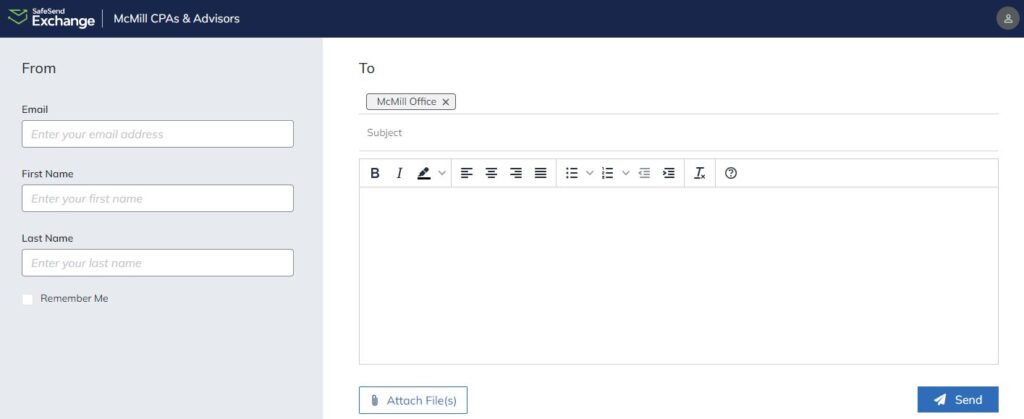
Using SafeSend – A secure, simple way to send and receive files from McMill
Best Practices for Sending Files
► Before sending files, collect ALL your documents – one upload is preferred
► Combine files (especially tax documents) in one pdf file, when possible
► Keep “McMill Office” in the “To” field
► In the large message box below the “Subject” line type the Recipient’s name (example – ATTN: CPA Joe Smith) in the message box along with any other notes
► Click the “Attach File(s)” button to select your file(s) OR drag them into the large message box below the “Subject” line (limit use of photos (JPEGs, etc.))
► After all your files are loaded, then click the “Send” button one time
These processes improve our efficiency and help keep costs down.
SafeSend allows us to offer a secure way for you to send all your important documents to our team. Instead of sending sensitive information through email, you can quickly send us your files by dragging them into the SafeSend dropbox window, accessible by clicking the button above.
SafeSend Returns – Option for Delivery and E-Signing of Prepared Returns
If interested, let your CPA know or contact McMill directly.
SafeSend allows you to securely review and sign your return—all from your computer, tablet or smartphone.
We are proud to offer our clients an e-signing platform where you can:
► Review your return
► E-sign for your 1040
► View scheduled payments
► Easily pay taxes and invoices directly from your device
► Estimated tax reminder emails
► Download, sign and disperse K-1’s electronically
Access Copies of Completed Tax Returns
When your return is complete, McMill will send you an email with instructions for you to access your return via SafeSend.
SafeSend FAQs
Check your spam/junk email folder. If you do not receive your code within 10 minutes, please request another code.